

For private landlords
Built for private landlords. Proven by WA property managers.
PCRPro is the condition report app WA real estate agencies use every day, now set up for landlords who manage their own rentals.
Designed by WA inspectors with 10,000+ condition reports behind them. Used by leading rental agencies across Western Australia.
It’s easy to use.
Walk through, photograph each room, and PCRPro drafts the report from your photos. You check it, sign it off and send it to your tenant from your phone.
It keeps your records together.
Every ingoing, routine and final report is saved against the property, with every photo, note and tenant signature, tenancy after tenancy.
$29 a month on Starter (up to 5 properties, cancel anytime), or $119 a year for one property
Rather not do it yourself? Have the inspectors at WA Rental Services do your ingoing report, with 3 months of PCRPro included. Get a quote
If you self-manage, the condition report is your bond claim.
When a tenancy ends and there’s a dispute over carpet stains, a chipped benchtop or a missing blind, the only thing that counts is what was written down and photographed at the start.
Most private landlords are working from a template they downloaded years ago, plus a camera roll with 300 unlabelled photos. Writing it up can take an evening, and it’s easy to miss something. If it ever goes to a tribunal, it’s easy to pick apart.
PCRPro gives you the same reporting tools professional property managers use, sized for someone with one to five properties. It also does most of the writing for you.
One subscription covers the whole tenancy.
Every report you need, from move-in to move-out, all in one place.
Ingoing PCR
Record the property’s condition before the tenant moves in. Take the photos, let PCRPro draft the write-up, then send it for the tenant to review and sign.
Routine inspections
Check in on the property during the tenancy. Photograph each room, note any maintenance or issues, and send a tidy report so there’s a record of how the property is being kept.
Final PCR
Start the final report from the ingoing one, with every room, item and start-of-tenancy note already filled in. Record what’s changed and mark each issue as wear and tear, damage or cleaning.
Because every report sits against the same property, you can go back to any tenancy and see how the property looked at move-in, at each routine and at move-out. Your evidence doesn’t end up spread across emails, folders and camera rolls. There’s no limit on the number of inspections.
Step by step, from move-in to move-out
- 1
Set up the property once
Add the address and the rooms: kitchen, bathroom, bedrooms, outdoor areas. PCRPro sets out the standard items for each area (walls, floors, ceilings, fixtures, windows and so on), and you can add or remove items to suit the property. - 2
Photograph each room
Walk through with your phone or tablet and take photos of each area with the in-app camera. There’s no need to stop and type as you go. - 3
Let PCRPro write it up
On your ingoing report, tap Generate from Photos and PCRPro reads your photos and drafts the report for that room:
- a written condition description for each item, such as “Carpet generally clean, minor wear to high-traffic area near doorway”
- Clean / Undamaged / Working ticked for each item
- a count of what it found (for example, 3 power points or 2 light fittings), so you can spot a miscount at a glance
- suggestions for items the template missed, such as a ceiling fan or security screen
Nothing is saved until you’ve checked it. Keep what’s right, change what isn’t, and add your own notes or voice notes. The drafts are written in the language used across real WA condition reports.
- 4
Send it to your tenant
Send the tenant a secure link with a single tap. They don’t need an account or an app. They can see every photo and note and add their own comments and photos against any item they disagree with. When they’re done they sign it, and their signature is timestamped. You get an email as soon as they’ve finished. - 5
Get a report you can use
Download a PDF or Word report with your details, every photo, every comment from both sides and a signature page. It’s saved against the property, so you’re not digging through emails at the end of a tenancy. - 6
Keep an eye on things during the tenancy
Run routine inspections the same way: photograph each room, note anything that needs attention and send the report. Each one is added to the property’s history. - 7
Do the final inspection in half the time
When the tenancy ends, start the final report from the ingoing one. Every room and item is already there, along with what you recorded at the start, so you only need to note what’s changed. You can then compare start and end side by side and mark each issue as fair wear and tear, tenant damage or cleaning, which makes it easier to back up a bond claim.
What’s included
- Every report type: ingoing PCR, routine inspections and final PCR
- AI photo-to-report: write-ups for every item, drafted from your photos
- Photo-first reporting: in-app camera, gallery import, drag to reorder, 360° photos
- Voice notes: talk instead of typing, transcribed automatically
- Works offline: inspect with no reception and sync later
- Tenant review and e-signature: a secure link, the tenant’s comments and photos against each item, and a signed declaration
- Built around the 7-day window: the tenant link locks after 7 days in line with WA requirements, reminders go out automatically, and you can reopen it if needed
- Copy from the ingoing report: final inspections come pre-filled from the original
- Review and classify: sort each end-of-tenancy issue into wear and tear, damage or cleaning
- PDF and Word export: tidy reports with photos, ready to send or file
- Property notes: keep keys, alarm codes, quirks and past issues with the property
- iPhone, iPad, Android and web
Why landlords use it
Proven by agencies.
The same app WA property managers rely on for their inspections, with nothing cut back for private landlords.
A report in about the time it takes to take the photos.
PCRPro drafts the write-up while you’re still on site, so there’s nothing left to type up at night.
Your whole tenancy history in one place.
Every ingoing, routine and final report for a property is kept together, with every photo and tenant comment, across every tenancy. If there’s a dispute, it’s all there.
You’re covered if there’s a dispute.
Dated photos, notes against each item and a signed tenant review give you the kind of record that holds up at a bond dispute.
Fewer things missed.
Every item is described, and PCRPro points out fixtures in your photos that aren’t on the list yet.
It looks professional.
Tenants take a clean, consistently worded report more seriously than a filled-in PDF, and it sets the tone for the tenancy.
The tenant can’t say they never saw it.
You can see when the link was sent and opened, and when the tenant submitted it.
How it works
Your ingoing report, done on your phone in one visit.
- 1
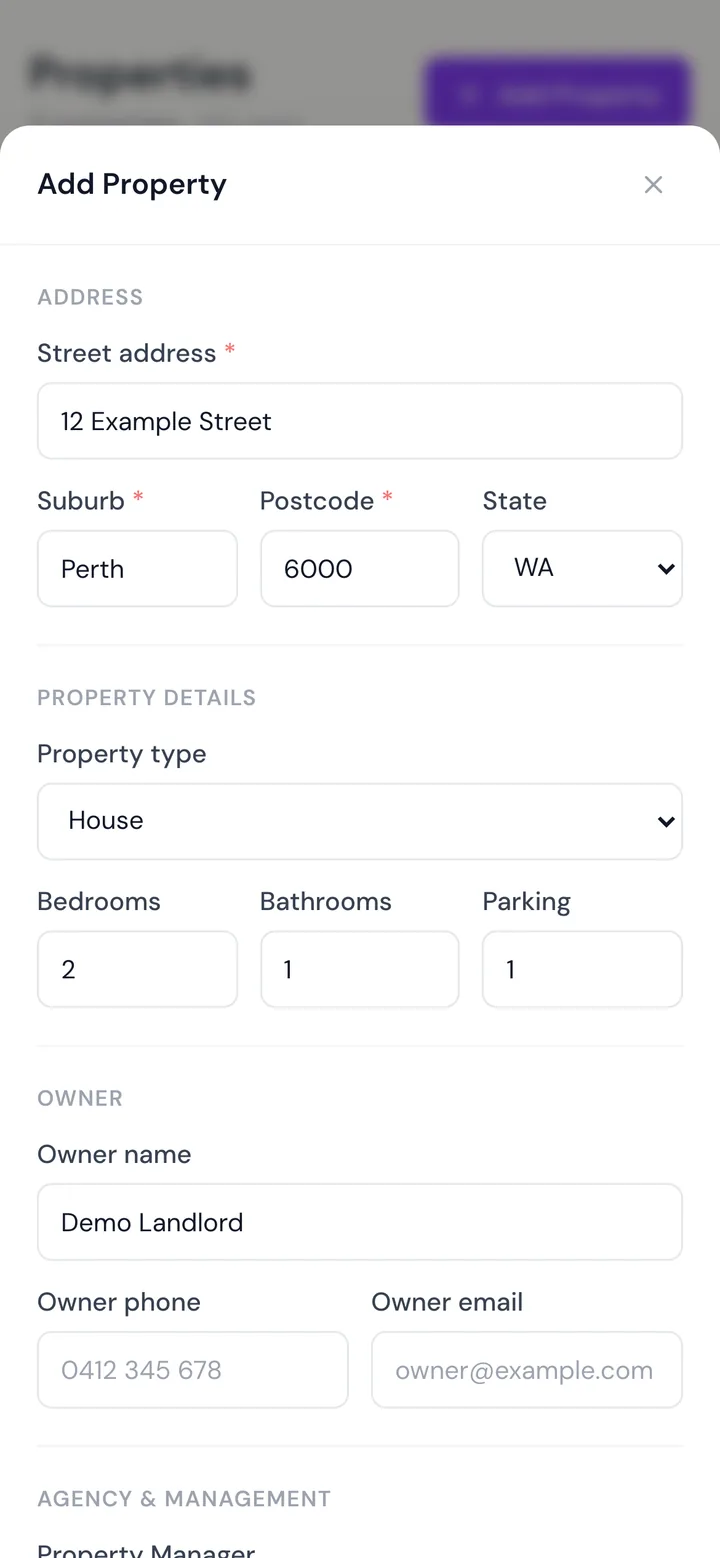
Add your property
Enter the address and rooms. It takes a couple of minutes.
- 2
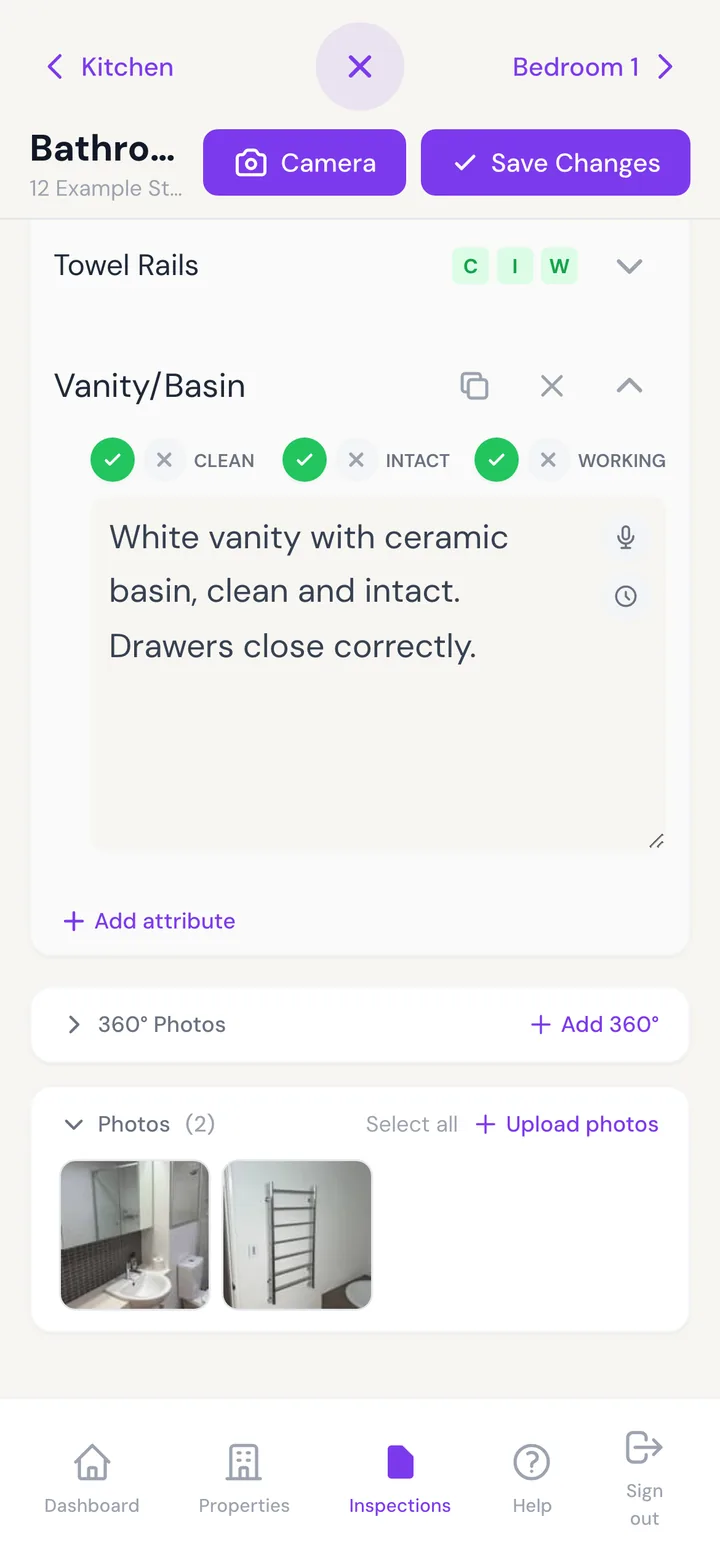
Walk through room by room
Take a photo, add a note, move to the next item.
- 3
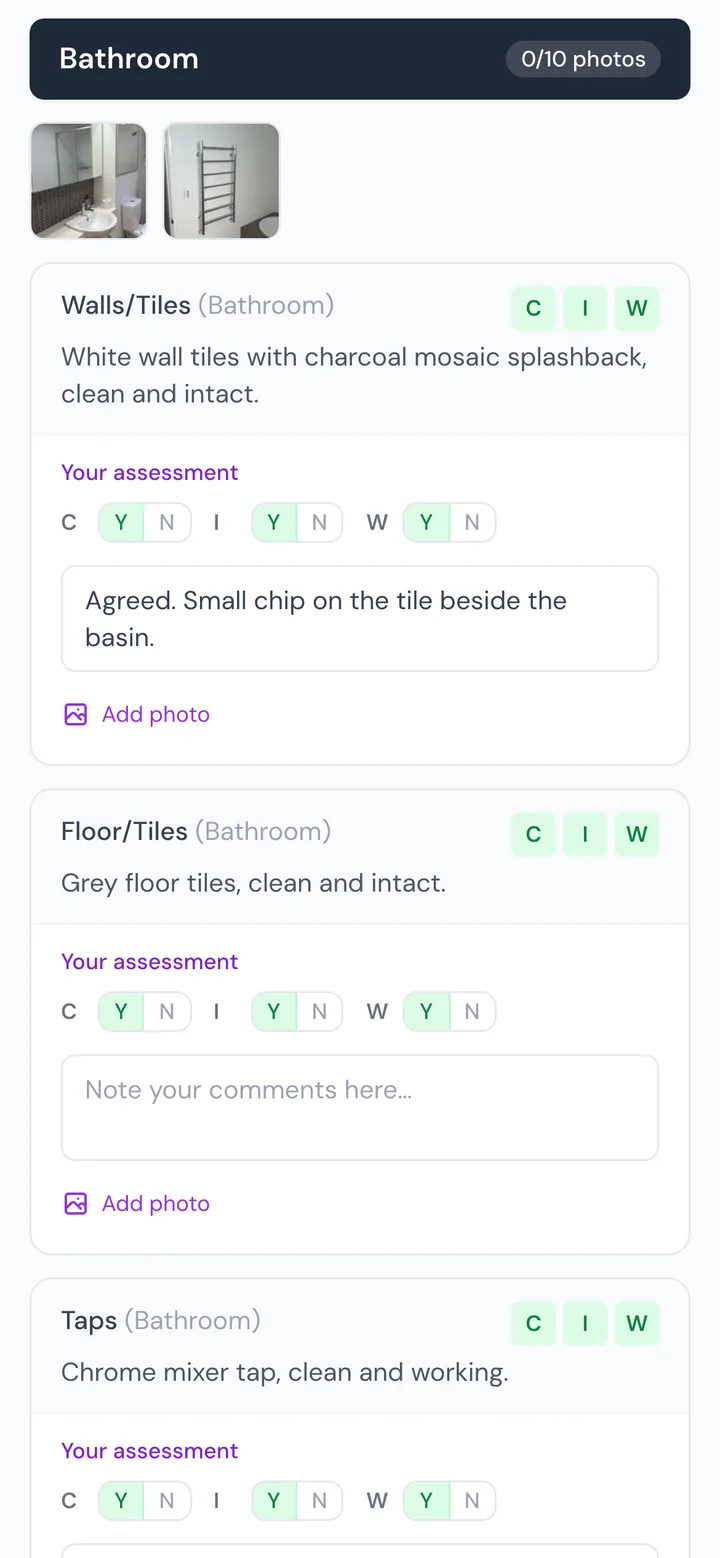
Send it to your tenant
They get a link to review, comment and sign. No app or account needed.
- 4
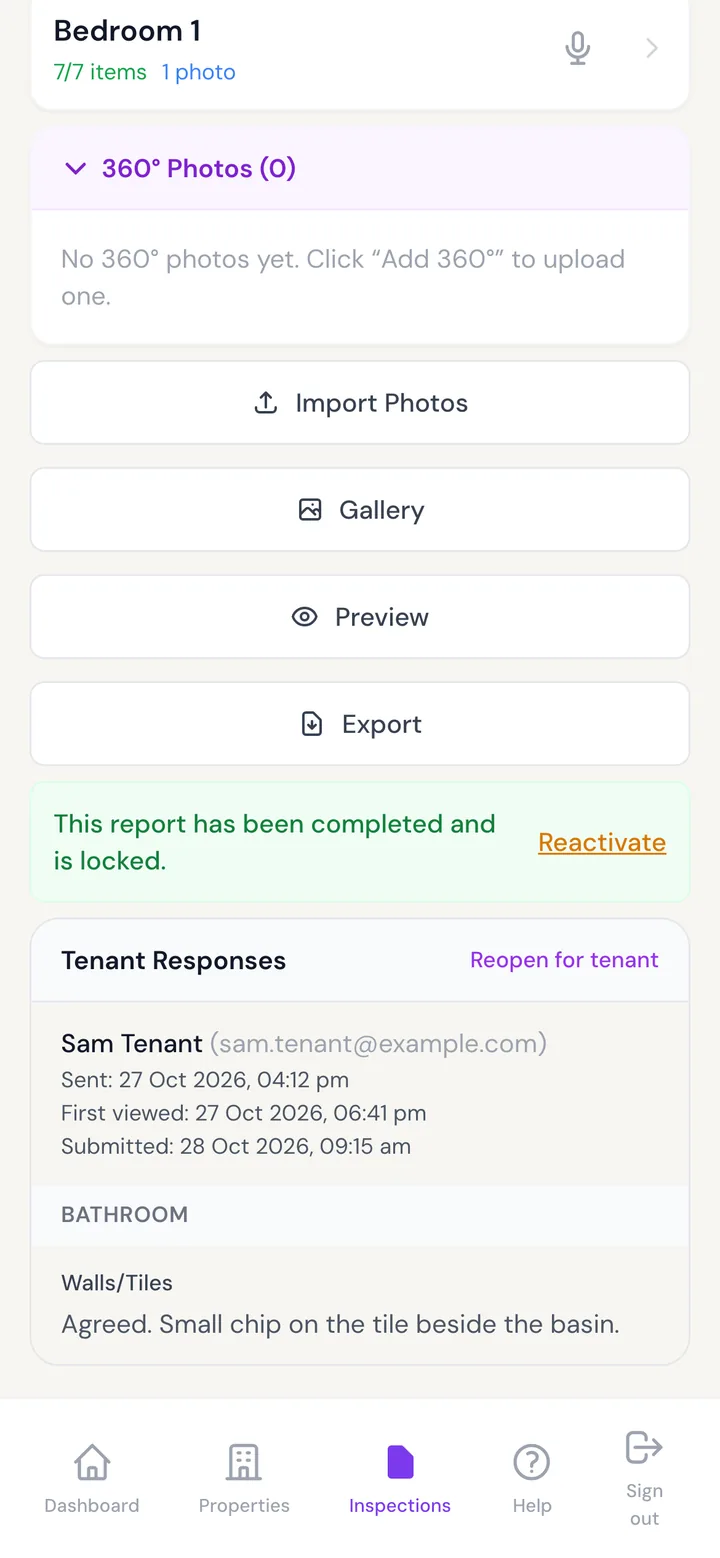
Track it and keep it
See when it’s opened and signed, and download the PDF whenever you need it.
Pricing
Starter · up to 5 properties
$29 a month
Cancel anytime
- Unlimited ingoing, routine and final reports
- AI photo-to-report
- Tenant review and e-signature
- PDF and Word reports
- All features, no lock-in
Landlord · one property
$119 a year
Billed annually · covers the ingoing report now and the outgoing one when the tenancy ends
Everything in Starter, for a single rental. The cheaper choice if you only have one property.
Choose Landlord: $119 a yearManaging more than 5? Talk to us about larger plans.
Cancel any time. Your reports stay available to view and download, and you can reactivate within 24 months when the next tenancy ends.
FAQ
Who designed PCRPro?
PCRPro was designed in Western Australia by the inspectors at WA Rental Services. Each has more than 10 years in the field, and together they’ve completed more than 10,000 condition reports for WA rental properties. PCRPro is the tool they designed from that experience.
Who else uses PCRPro?
WA Rental Services and leading rental agencies across Western Australia use it for their condition reports and inspections. The landlord plan gives you the same app.
What reports can I do with my subscription?
All of them: ingoing PCRs, routine inspections and final PCRs, as many as you need for the properties on your plan — one on Landlord, up to five on Starter.
Does the AI write the report without me checking it?
No. It drafts the descriptions and ticks, and you review every one before anything is saved. The report is still yours.
Do my tenants need to download anything?
No. They get an email with a secure link that works in any browser.
What if there’s no mobile reception at the property?
You can take photos and record everything offline, and it syncs once you’re connected. Generating the write-up from photos needs a connection, so you can run it later from the car or at home.
Is it only for WA?
It’s built around WA condition report requirements, but the reporting works for any Australian rental.
Rather not do it yourself?
Have the inspectors at WA Rental Services do your ingoing report, with 3 months of PCRPro included. The report is set up in your own PCRPro account, so it’s there for your routine inspections and the final report when the tenancy ends. Get a quote
Can I subscribe for one month and cancel without any extra charges?
On Starter, yes — it is month to month; cancel any time from your account page and nothing further is charged. Your access runs to the end of the month you have already paid for. The Landlord plan is billed annually.
If I cancel and come back months later, can I reactivate my existing account?
Yes, within 24 months of your subscription ending. Sign in with the same login and reactivate from the account page. Your properties, reports and photos are restored exactly as you left them — no need to set anything up again.
Are my reports, photos and property details kept while my subscription is inactive?
Yes. Nothing is deleted when your subscription ends. Your properties, reports and photos stay in your account, and you can view and download them whenever you need to.
Can I view or download my reports while my subscription is inactive?
Yes. An inactive account becomes read-only: you can still sign in, open every report and download the PDFs. You just can't create or edit inspections until you reactivate.
Can I use my ingoing report to prepare the outgoing report when the tenancy ends?
Yes — that is the main reason to keep the account. Reactivate when the tenancy is ending and PCRPro creates the outgoing report from the original ingoing report, room by room, with the move-in photos alongside for comparison.
How many photos can I add to a report?
There is no fixed limit per report, area or item. Take as many as you need to document the condition properly — large photos are resized automatically so reports stay fast to open.
Is there a cheaper option for a single property?
Yes. The Landlord plan covers one property for $119 per year — the price of a few weeks' rent for a full ingoing and outgoing record. If you have more than one property, Starter covers up to five.
Take it on-site
Capture photos, complete inspections, and generate reports — all from your phone. Works offline, syncs automatically when you're back online.


Every report for every tenancy, in one place.
Get started: $29 a monthRather not do it yourself? Have the inspectors at WA Rental Services do your ingoing report, with 3 months of PCRPro included. Get a quote